
对话框组件
大约 2 分钟easyui
案例
带有日历控件
本案例见旭纸业项目文件 jh_delivery_list_report.html
<div id="dlg_printDeliveryPlan" class="easyui-dialog" title="打印发货计划"
    data-options="iconCls:'icon-save',closed:true",resizable:true
    style="width:300px;height:450px;padding:10px">
    <h3>选中日期后点击“打印”</h3>
    <div id="calendar_deliveryPlan" class="easyui-calendar" style="width:250px;height:250px;"></div>
    <br>
    <div align="right">
        <a href="#" class="easyui-linkbutton" data-options="plain:false" style="width:100px" onclick="printDeliveryPlan()">打印</a>
        <!-- <a href="#" class="easyui-linkbutton" data-options="plain:true" onclick="closeDlg_printDeliveryPlan()">取消</a> -->
    </div>
</div>
效果如下
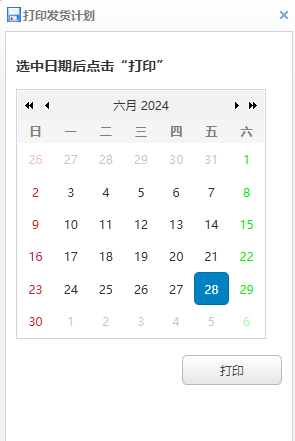
获取选中日期的方法
function fillExplicitLength2(param) {
    if (!param) return "01";
    let str = param.toString();
    // 在字符串前面填充0直到长度达到2
    return str.padStart(2, "0");
}

// calendar_deliveryPlan是日历控件的ID
$('#calendar_deliveryPlan').calendar({
    onSelect: date => {
        let tmp = date.getFullYear() + "" + fillExplicitLength2(date.getMonth() + 1) + "" + fillExplicitLength2(date.getDate())
        this.deliveryPlanDate = tmp
    }
});
带有表格
本案例见旭纸业项目的文件 jh_plan_bill_registe_sub.html
<div id="updateQtyDialog" class="easyui-dialog" data-options="closed:true,left:0,top:0">
    <div class="input-group">
        <input class="easyui-textbox" id="planQtyUpdate" name="planQty" data-options="label:'计划数量:', labelAlign:'right', readonly:true,">
        <input class="easyui-textbox" id="fitQtyUpdate" name="fitQty" data-options="label:'贴合数量:', labelAlign:'right', readonly:false,">
        <input class="easyui-textbox" id="qualifiedQtyUpdate" name="qualifiedQty" data-options="label:'良品数量:', labelAlign:'right', readonly:true,">
    </div>
    <table id="updateQtyGrid"></table>
</div>
调整宽高
使用 js 创建 dialog 时候设定宽高
$(`#editDialog`).dialog({
  closed: false,
  width: EDIT_DIALOG_WIDTH,
  height: EDIT_DIALOG_HEIGHT,
  modal: true,
  resizable: true,
  title: '设置数量',
  iconCls: 'icon-edit',
  onOpen: function () {
    $.parser.parse($('#editDialog'));
  },
  onClose: function () {
    $(this).dialog('destroy');
  },
基本用法
在 data-options 中设置 left top 为0则对话框会显示在左上角。如果要居中显示只要将这两项去掉,则默认显示是居中
<!-- data-options 里的 left 表示对话框左侧距离为0  -->
<div id="dlg_ProductFileLit" class="easyui-dialog" title="存货档案精简信息"
     data-options="iconCls:'icon-save',closed:true,left:0,top:0"
     style="width:400px;height:230px;padding:10px">
</div>
显示与隐藏
$('#dlg_ProductFileLit').dialog('open')
$('#dlg_ProductFileLit').dialog('close')