
染厂云
服务器信息
IP地址:49.xxx.xxx.119 登录密码见WPS账号与密码文件 重启后会自动启动 tomcat 导致占用443端口, nginx 无法启动,杀掉进程即可
2024年9月21日 07:32:11 查看服务器,已经没有 tomcat 进程
域名
- wireguard - http://ldwg.xdfznh.club/wg/
- 开源项目 tududi 通过
docker方式部署在xdf250.ubuntu22server,访问地址 登录账号是自己的QQ邮箱地址,密码是最简单的数字+英文,通过nginx制作了反向代理,为这个二级域名申请了SSL证书
todo
使用 trae 开发的 todo 应用,部署在 /projs/todo/ 下,有后台服务,需要在前端页面中设置同步的后台服务 https://染厂云域名/todos/sync,创建了两个账号,有一个自己常用的账号和最简单数字+英文密码
visitor
- 项目路径:
/projs/visitor - 启停服务:
systemctl stop visitor
openvpn
本机安装的是 openvpn 客户端,服务端是 织造云数据 的服务器,于 2024年10月18日 重新制作了证书,到期日是 2027.1.21
systemctl start openvpnclient.service
systemctl stop openvpnclient.service
yum
# 查看本机通过 yum 安装的所有软件
yum list installed

# 查看指定名称的软件
yum list installed git

# 查看软件安装的具体版本号
rpm -qa|grep git

# 查看安装目录(通过上面命令找到精确的软件版本号)
rpm -ql git.x86_64
git
可执行文件目录 /usr/bin/git
启动与停止
2022年9月9日 15:28:28 添加了远程调试功能,修改了默认端口号,用户配置文件在: /usr/lib/systemd/system/wxpad.service 系统配置文件在:/etc/systemd/system/wxpad.service 本项目的守护进程的配置文件是后者
采用了后台管理,相关命令:
// 启动 systemctl start wxpad // 停止 systemctl stop wxpad所有后台服务
2021年10月28日 08:56:30 整理
visitor
访客系统SAAS,项目路径是:
/projs/visitor,日志文件在/sbJarLogs/visitor/,守护进程对应的配置文件是/usr/lib/systemd/system/visitor.service,本项目使用了外部配置文件application.yml所以数据库参照该配置文件中的设置git
jenkins(docker安装)
frp
java
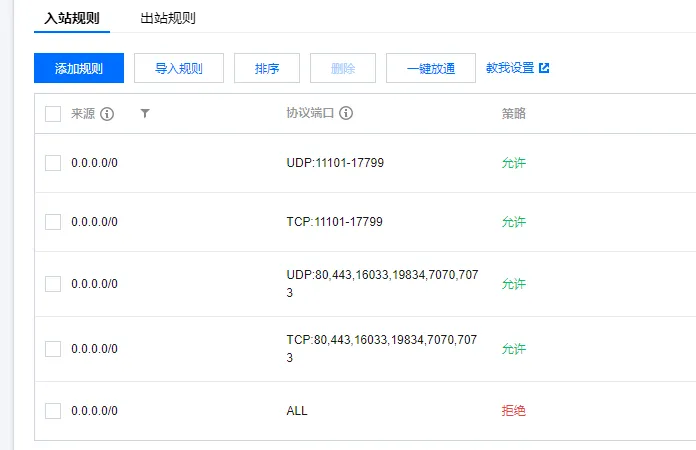
nginx - 80,443
mysql
pptpd
atools - 7073
wxpad - 7070
2021年10月28日 09:08:35 设置的安全组规则如下
代码生成器
项目绝对路径是 /projs/zknote,其中包含前端项目、后端项目。后端项目连接本机数据库 zhike。项目访问地址:https://染厂云域名/zk/,后端项目仓库 https://gitee.com/chanchaw/zknotebe 前端项目仓库 https://gitee.com/chanchaw/zhike-note
nginx 中前端项目的配置
# zknote 前端 vue+vite 项目
location /zk {
    alias /projs/zknote/frontend;
    index index.html;
    try_files $uri $uri/ /index.html;
}
后端项目配置
# 代码生成器后台
location /zknoteb {
    proxy_set_header Host $host;
    proxy_set_header X-Forwarded-For $proxy_add_x_forwarded_for;
    proxy_pass http://127.0.0.1:8086/zknoteb;
    proxy_redirect http://127.0.0.1:8086/zknoteb /zknoteb;
    proxy_cookie_path /zknoteb /zknoteb;
}
jenkins
rpm包安装
启动命令 systemctl restart jenkins
软件离线安装包在 /usr/local/jenkins-2.249.3-1.1.noarch.rpm
安装后的目录是 /var/lib/jenkins
访问地址 没有SSL证书的域名:8081
登录账号是双C账号,密码是简单数字+账号
docker安装
docker方式安装后制作的映射目录下 /usr/local/jenkins_home
# 查看本机所有 docker 容器
docker ps -a
# 启动已经存在的容器
docker start 519ed60693a0
# 检查正在运行的容器
docker ps
frp
frp路径在 /usr/frp ,手动启动命令:./frps -c ./frps.ini 2020年10月20日 14:20:06 制作了守护进程管理 在 vim /usr/lib/systemd/system/frps.service 所以之后可以 systemctl start frps
nginx
路径在 /etc/nginx ,要更新前端项目的话记得同时更新该目录下的 html 中的内容以及 /projfe 下的对应项目 没有设置自动启动,手动启动的方式:sudo nginx
- IP黑名单 - 2025年2月9日 在路径
/etc/nginx/conf.d/blockip.conf设置IP地址黑名单(nginx主配置文件中设置了包含路径conf.d下的配置文件)
2025年7月25日 升级一系列依赖和内核功能后,新东方智能化服务号微信推送的收发货模板消息点击查看详情显示 Welcome to CentOS 页面,说明 nginx 的默认首页路径被更换了,原本首页目录是 /etc/nginx/html/ ,此后是 /usr/share/nginx/html,所以将前面路径下的所有文件拷贝到后面路径下,在微信中查看详情就可以了,注意跳转到详情页的 web 页面需要通过菜单刷新后查看最新效果
微信后台
概述
本服务器上部署了服务号 “常熟市新东方智能化” 的后台和前端项目
推送的前端
推送给用户的模板消息中关联的前端项目是 /projfe/wxpadfe
报表前端
服务号的前端项目是 /projfe/wxpadfe/meter
wxpad
springboot后台仓库是 wxpad: 新东方智能化微信服务号后台程序
已经制作启动管理,使用 systemctl start/stop wxpad 启动和关闭项目,设置了开机启动
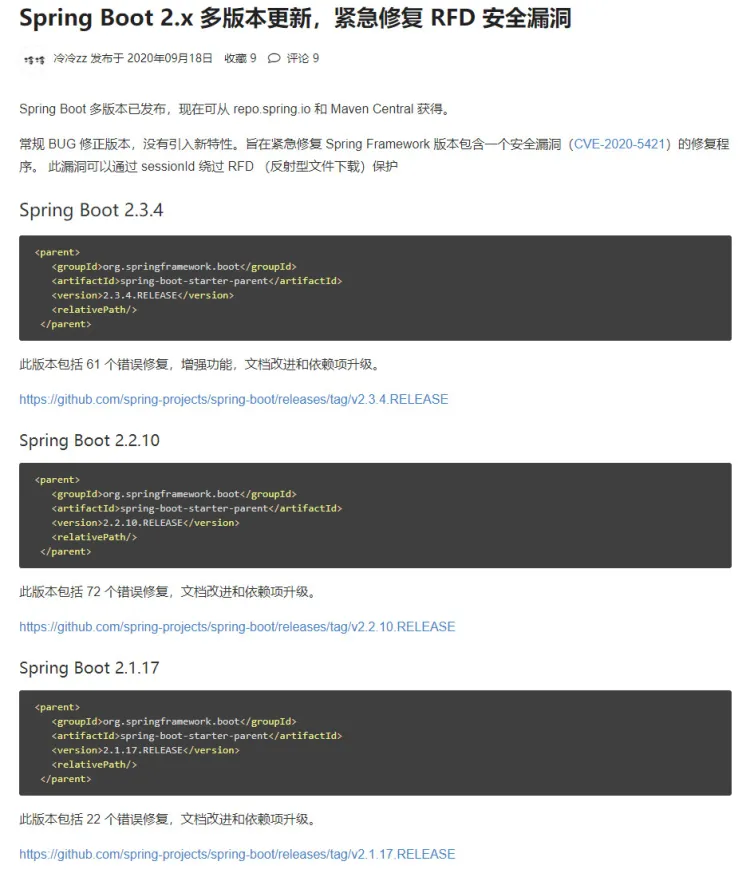
2020年10月27日 14:29:06 腾讯云服务器报了 spring 的漏洞:发射型文件下载漏洞,当前使用的 springboot 版本号是2.1.8,对应使用了 spring framework 5.xx (忘记了。。。)然后升级 springboot 到2.3.4 结果导致 dom4j报红线,无法编译,然后降到2.2.10 dom4j就没问题了,编译后上线,关于该漏洞的解决方案如下
datav
2020年11月1日 16:27:51 制作了 datav 项目的后台服务,并且纳入 systemctl 管理,启动命令: systemctl start imooc-datav 路径在 /projs/imooc-datav 下,测试请求:http://www.xxx.club/datav/datavOrder/selectAll
atools
2020年11月13日 10:42:32 制作了 atoolsbe 后台服务,纳入 systemctl 管理,启动命令是: systemctl start atools 后台服务在云服务器的路径是 /projs/atools ,前端项目在 /projfe/atoolsfe 测试后端服务:https://www.xxx.club/atoolsbe/cashType/selectAll
reids
2022年12月30日 安装 redis 5.0.14,绝对路径在 /usr/local/redis-5.0.14
制作了主从架构,主节点端口号6379,两个从节点分别是:6380,6381,对应的配置文件分别是:redis.conf , redis6380.conf , redis6381.conf
主节点密码:!WHITEredis20221217+织造云数据服务器IP地址@
2022年12月31日 部署 redis cluster
redis-cluster 模式下 /usr/local/redis-cluster/8001 和 /usr/local/redis-cluster/8004
是两个 redis 节点
2024年4月16日 14:00:34 开始设置开机启动,为 zknote 后台服务
jzysoft
在路径 /usr/lib/systemd/system/ 下创建了守护进程用到的 service 文件 jzysoft.service 和 jzysoftr.service,分别对应项目的后台和报表服务
系统登录
2020年10月27日 10:12:34 修改 ssh 端口号为线下 Windows 端口号+1
多线程推送工序刷卡模板消息
2022年9月9日在 com.xdf.wxpad.util.Schedule # pushProcess 中使用了多线程推送工序刷卡的模板消息
日志
2022年8月5日
更换 openvpn 前各个厂家地址
INSERT INTO weixin_cloud.mill (sid, status, seq, create_time, flow_meter, port_erp, port_llj, effective) VALUES ('乐达三车间', 1, 17, '2022-02-17 17:26:56', false, 14275, 14276, true);
INSERT INTO weixin_cloud.mill (sid, status, seq, create_time, flow_meter, port_erp, port_llj, effective) VALUES ('五洲六', 1, 0, '2021-10-13 14:21:10', false, 0, 13676, true);
INSERT INTO weixin_cloud.mill (sid, status, seq, create_time, flow_meter, port_erp, port_llj, effective) VALUES ('元晖实业', 1, 0, '2021-03-10 15:01:12', false, 13375, null, true);
INSERT INTO weixin_cloud.mill (sid, status, seq, create_time, flow_meter, port_erp, port_llj, effective) VALUES ('利丰印染', 1, 0, '2021-04-10 08:23:31', false, 12575, null, true);
INSERT INTO weixin_cloud.mill (sid, status, seq, create_time, flow_meter, port_erp, port_llj, effective) VALUES ('华宇印染', 1, 8, '2020-05-09 15:32:55', false, 12175, null, true);
INSERT INTO weixin_cloud.mill (sid, status, seq, create_time, flow_meter, port_erp, port_llj, effective) VALUES ('新东方智能化', 1, 6, '2019-12-15 16:21:14', false, 7235, null, true);
INSERT INTO weixin_cloud.mill (sid, status, seq, create_time, flow_meter, port_erp, port_llj, effective) VALUES ('新盛毛纺', 1, 5, '2019-12-15 16:21:14', false, 0, 11276, true);
INSERT INTO weixin_cloud.mill (sid, status, seq, create_time, flow_meter, port_erp, port_llj, effective) VALUES ('新盛针纺', 1, 7, '2020-04-22 13:07:39', false, 0, 12076, true);
INSERT INTO weixin_cloud.mill (sid, status, seq, create_time, flow_meter, port_erp, port_llj, effective) VALUES ('新达印染', 1, 1, '2020-06-03 16:29:46', false, 11675, 11676, true);
INSERT INTO weixin_cloud.mill (sid, status, seq, create_time, flow_meter, port_erp, port_llj, effective) VALUES ('昆山针织', 1, 10, '2020-05-09 15:32:55', false, 11775, null, true);
INSERT INTO weixin_cloud.mill (sid, status, seq, create_time, flow_meter, port_erp, port_llj, effective) VALUES ('朗迪印染', 1, 2, '2019-12-15 16:21:14', false, 11975, 11976, true);
INSERT INTO weixin_cloud.mill (sid, status, seq, create_time, flow_meter, port_erp, port_llj, effective) VALUES ('江阴天之然', 1, 18, '2022-06-14 16:55:00', false, 16075, 16076, true);
INSERT INTO weixin_cloud.mill (sid, status, seq, create_time, flow_meter, port_erp, port_llj, effective) VALUES ('泗水纺织', 1, 11, '2020-05-09 15:42:59', false, 13875, null, true);
INSERT INTO weixin_cloud.mill (sid, status, seq, create_time, flow_meter, port_erp, port_llj, effective) VALUES ('港荣印染', 1, 12, '2019-12-15 16:21:14', false, 13275, null, true);
INSERT INTO weixin_cloud.mill (sid, status, seq, create_time, flow_meter, port_erp, port_llj, effective) VALUES ('白玉兰', 1, 4, '2019-12-15 16:21:14', false, 15375, 11176, true);
INSERT INTO weixin_cloud.mill (sid, status, seq, create_time, flow_meter, port_erp, port_llj, effective) VALUES ('禾达印染', 1, 16, '2021-04-06 13:24:59', false, 13975, null, true);
INSERT INTO weixin_cloud.mill (sid, status, seq, create_time, flow_meter, port_erp, port_llj, effective) VALUES ('荣文印染', 1, 13, '2020-06-22 09:11:05', false, 7215, null, true);
INSERT INTO weixin_cloud.mill (sid, status, seq, create_time, flow_meter, port_erp, port_llj, effective) VALUES ('银海印花', 1, 0, '2020-10-06 08:57:23', false, 12675, null, true);
INSERT INTO weixin_cloud.mill (sid, status, seq, create_time, flow_meter, port_erp, port_llj, effective) VALUES ('阳丰织染', 1, 14, '2020-06-22 09:11:17', false, 13475, null, true);
INSERT INTO weixin_cloud.mill (sid, status, seq, create_time, flow_meter, port_erp, port_llj, effective) VALUES ('香山印染', 1, 3, '2019-12-15 16:21:14', false, 11375, 11376, true);
INSERT INTO weixin_cloud.mill (sid, status, seq, create_time, flow_meter, port_erp, port_llj, effective) VALUES ('香缘里', 1, 15, '2021-03-15 14:05:49', false, 11375, 11376, true);
远程调试 - 2022年9月9日 16:21:39
9.9 下午3点的 commit 第一次添加远程调试功能