字符集
概述
解决字符集相关的冲突问题
创建DB字符集一致
创建数据库时要保证字符集一致,2025年12月12日 为 SNBC 安装 MySQL8.2 时对方设置的默认字符集是 utf8mb4_0900_ai_ci,之前自己的项目默认字符集都是 utf8mb4_general_ci,在该服务器上以常用的字符集创建数据库后,将其他服务器上的数据库备份并还原到该服务器上所有表的 VARCHAR 类型字符都被默认 utf8mb4_0900_ai_ci 字符集,但是在执行存储过程时还是报错 Illegal mix of collations (utf8mb4_0900_ai_ci,IMPLICIT) and (utf8mb4_general_ci,IMPLICIT) for operation '='。执行 SHOW FULL COLUMNS FROM bd_project; 确认表字段确实是 utf8mb4_0900_ai_ci,但是依然报错字符集冲突,原因在于创建数据库的脚本
CREATE DATABASE IF NOT EXISTS nsk_ems DEFAULT CHARSET utf8mb4
COLLATE utf8mb4_general_ci;
中指定了数据库的字符集 utf8mb4_general_ci ,但是其下的表 varchar 字段都是 utf8mb4_0900_ai_ci。只要删除该数据库,在创建数据库时就指定使用 utf8mb4_0900_ai_ci 即可。即安装数据库时指定了字符集,之后创建的数据库也要使用该字符集,否则到处冲突。
统一字符集
概述 1/2
springboot 项目运行在 CentOS64位上,前端使用 Angular 开发,在修改数据时报错、
### Error querying database.  Cause: java.sql.SQLException: Illegal mix of collations (utf8mb4_croatian_ci,IMPLICIT) and (utf8mb4_unicode_ci,IMPLICIT) for operation '='
### The error may exist in file [C:\software\ideaProjs\bjsf\target\classes\mapper\business\GoodsMapper.xml]
### The error may involve com.ccsoft.gsms.dao.GoodsMapper.getMethodNames-Inline
### The error occurred while setting parameters
### SQL: SELECT getMethodNames(?);
### Cause: java.sql.SQLException: Illegal mix of collations (utf8mb4_croatian_ci,IMPLICIT) and (utf8mb4_unicode_ci,IMPLICIT) for operation '='
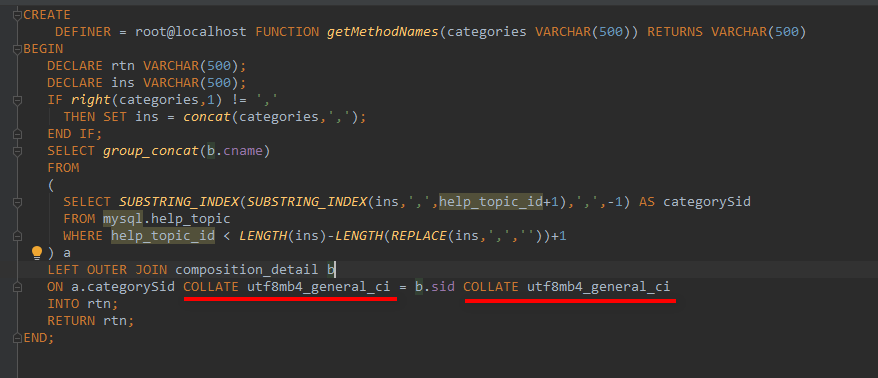
可以看到是字符集不对应,并且指出了问题出在函数 getMethodNames 上
解决 2/2
使用下面命令查看MYSQL服务器的字符集设置
show variables where Variable_name like 'collation%';
可以看到下面的结果: collation_connection = utf8mb4_general_ci collation_database = utf8mb4_croatian_ci collation_server = latin1_swedish_ci 修改上面3个字符集,使其统一
set collation_database=utf8mb4_general_ci;
set collation_server=utf8mb4_general_ci;
上面是运行时修改,要彻底修改要在配置文件 my.cnf 中修改 mysqld 下的同名的几个设置,修改配置文件要重启数据库才能生效 也可以在存储过程或者函数中显示的给出字符集,如下图