
classNames
小于 1 分钟react
安装
npm i classnames

# 导入
import classNames from 'classnames'
使用案例
内联样式
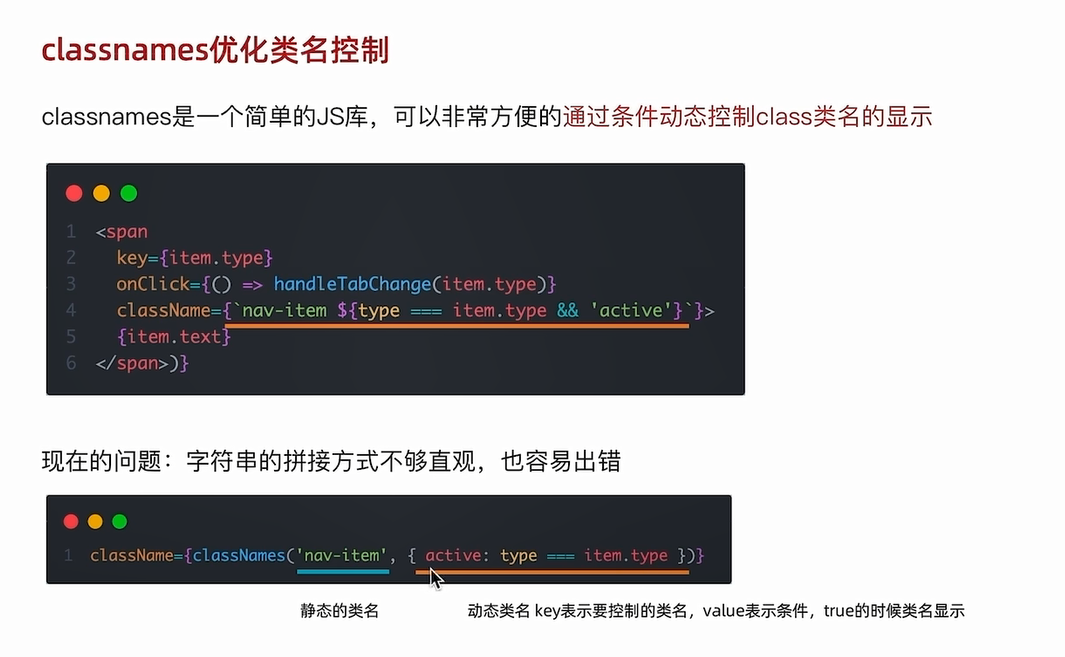
动态样式有两种写法,下面两种写法是等价的
<span className={`arrow ${dateVisible && 'expand'}`} />
<span className={classNames('arrow', dateVisible && 'expand')}></span>
上面代码一般用于卡片折叠的上下箭头切换的样式,两个样式分别是:arrow, arrow.expand 要使用后者通过连接的方式 dateVisible && 'expand' 生效
封装组件时的用法
下面是模仿 antd 的按钮组件,当传入 type='primary' 时就应用 primary 样式(用到了第三方插件 classnames)
import React from 'react'
import classNames from 'classnames';
import './index.css'

const Button = (props:any) => {
    const { className, type, children } = props;
    const cls = classNames({
        'ant-btn': true,
        [`ant-btn-${type}`]: type,
    })
    return <button className={cls}>{children}</button>
}

export default Button;