
redux
大约 3 分钟react
概述
术语解释
redux 的三个关键对象:action,reducer,store。action 可以理解为改变状态的动作,store 理解为存放状态 state 的仓库,中间的 reducer 有点难理解 官方对于该名称的解释是:
It's called a reducer because it's the type of function you would pass to Array.prototype.reduce(reducer, ?initialValue)
翻译为它是一个类型的函数,类似使用 Array.prototype.reduce(reducer, ?initialValue) 时的第一个参数 reducer。先看看这个方法的使用
import { createSlice } from "@reduxjs/toolkit";
import axios from 'axios'

const billStore = createSlice({
    name: 'billStore',
    initialState: {
        billList: []
    },
    reducers: {
        setBillList(state, action){
            state.billList = action.payload
        }
    }
})

const { setBillList } = billStore.actions

const getBillList = () => {
    return async dispatch => {
        const res = await axios.get('http://localhost:8888/ka')
        dispatch(setBillList(res.data))
    }
}

const reducer = billStore.reducer
export { getBillList }
export default reducer
上面一个完整的 billStore.js 的代码,属性 initialState 中包含所有的状态,属性 reducers 中是修改状态的方法,其传入的两个参数 state 和 action 是固定的设计模式,其中的 state.billList = action.payload 是修改状态,类似 javascript 中的 reducer 函数,传入状态变量和新的数据来更新状态。
制作步骤
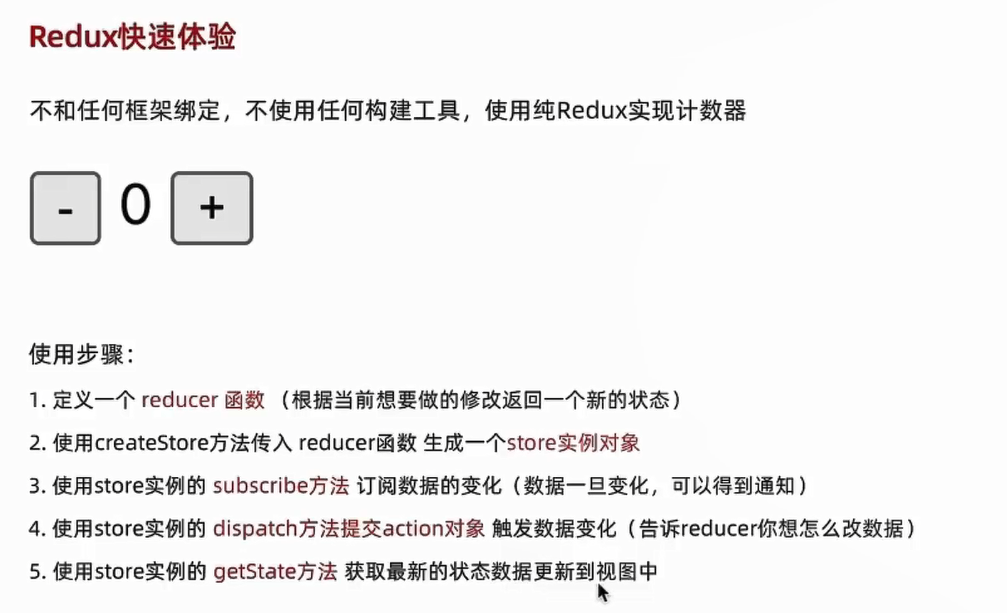
管理数据流程
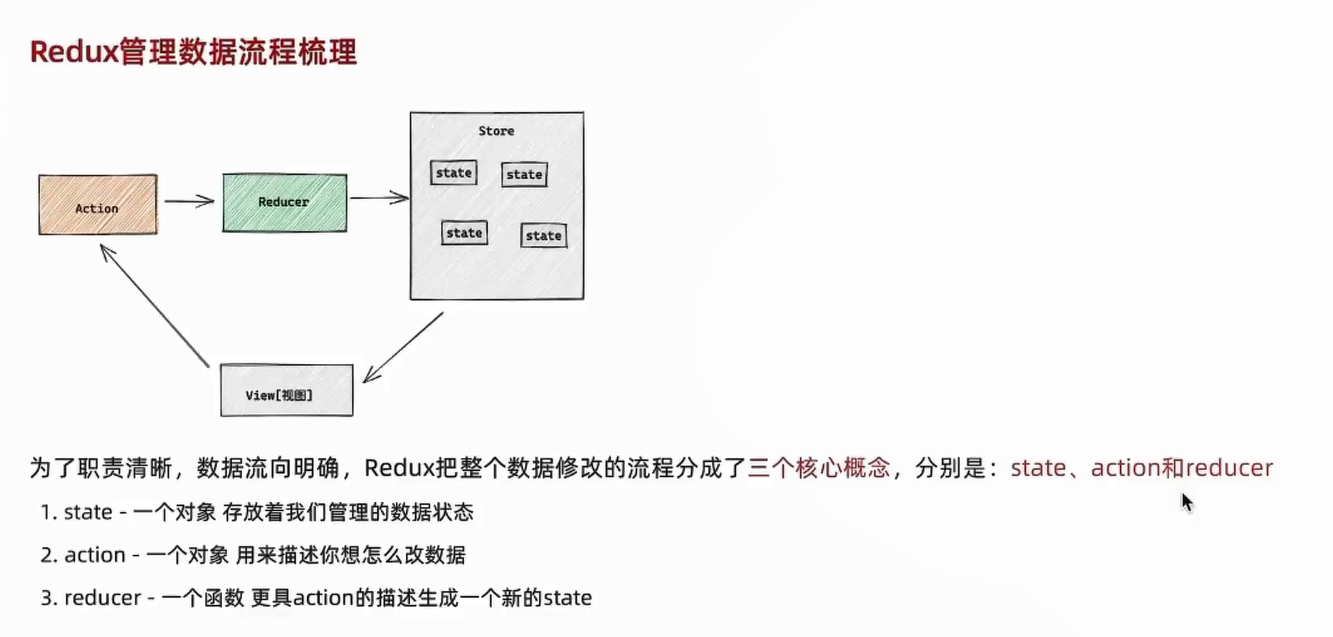
案例
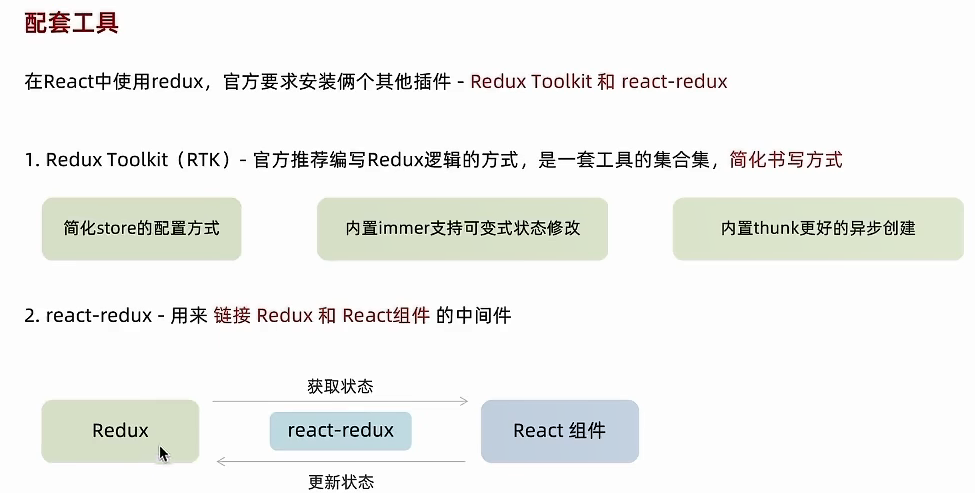
react中使用
配套插件
目录结构设计
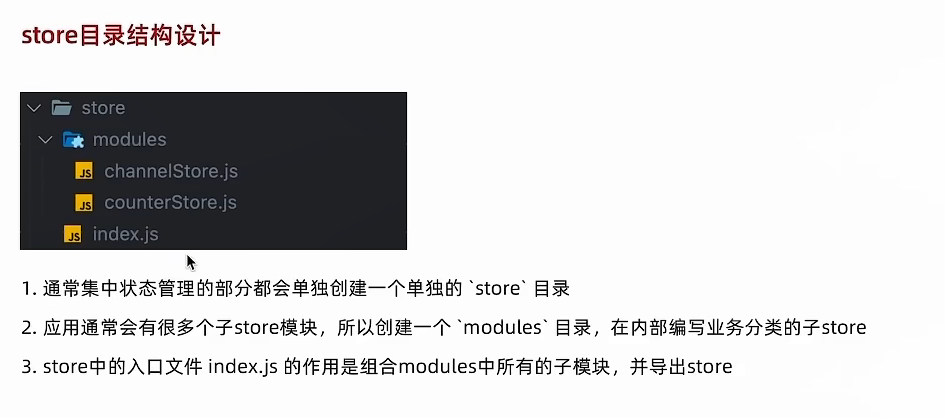
案例
目录结构1/5
创建如 [目录结构设计] 用于 redux
制作counterStore2/5
在 counterStore.js 中制作代码如下:
import { createSlice } from "@reduxjs/toolkit";

const counterStore = createSlice({
    name: 'counter',
    initialState: { count: 0 },
    reducers: {
        increment(state){
            state.count++
        },
        decrement(state){
            state.count--
        }
    }
})

// 结构出来 actionCreater
const { increment, decrement } = counterStore.actions
const reducer = counterStore.reducer

// 按需导出 actionCreater
export { increment, decrement }
// 使用默认导出的方式导出 reducer
export default reducer
redux入口文件3/5
在 redux 入口文件中制作如下
import { configureStore } from "@reduxjs/toolkit";
import counterReducer from './modules/counterStore'

const store = configureStore({
  reducer: {
    counter: counterReducer
  }
})

export default store
组件中使用4/5
组件中使用代码如下
import { useDispatch, useSelector } from "react-redux";
import { increment, decrement } from './store/modules/counterStore'

function App() {
  const { count } = useSelector(state => state.counter)
  const dispatch = useDispatch()

  return (
    <div className="App">
      <button onClick={() => dispatch(decrement())}>-</button>
      {count}
      <button onClick={() => dispatch(increment())}>+</button>
    </div>
  );
}

export default App
成功案例见 react集成redux
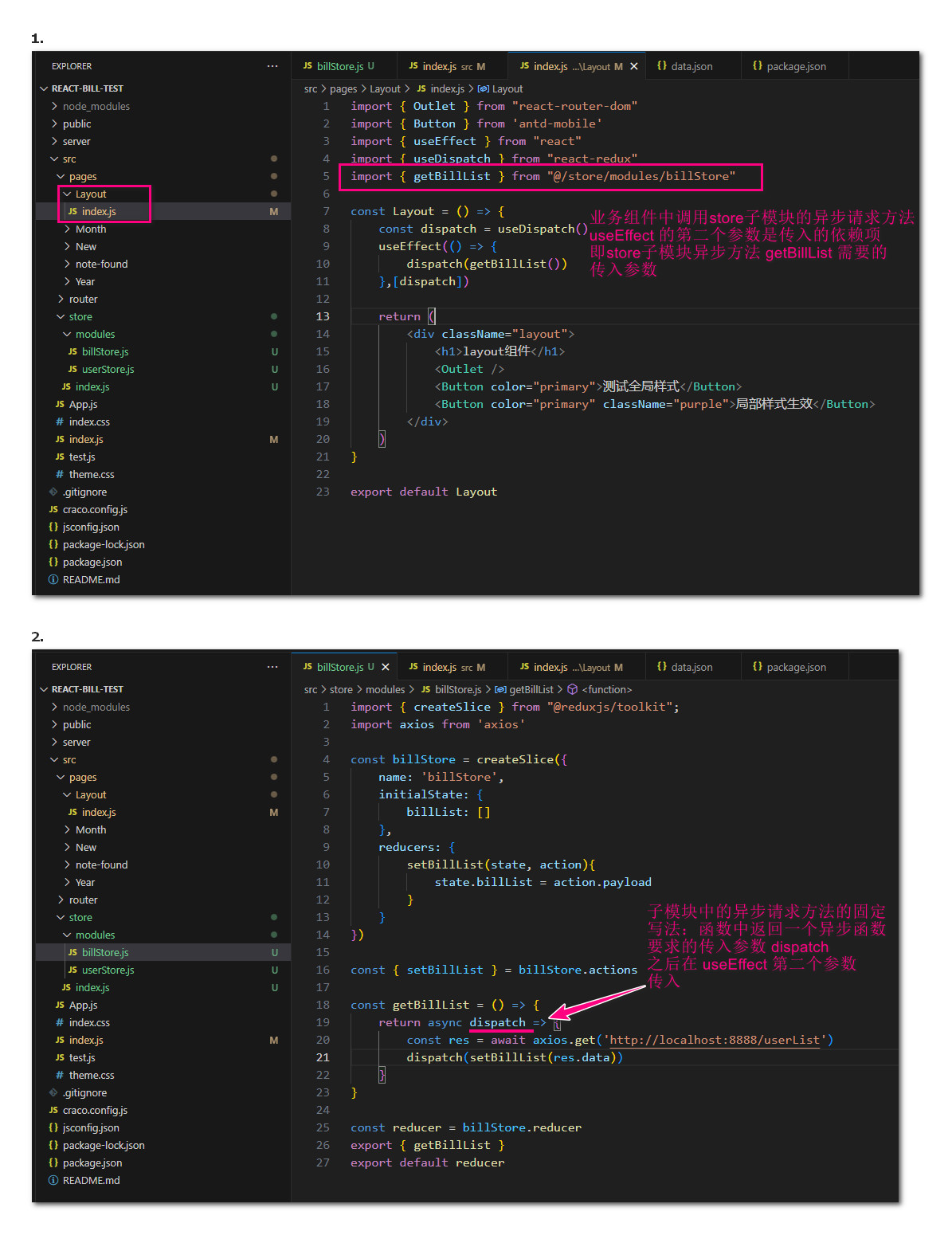
业务组件中调用 store 子模块异步方法请求数据时通过 useEffect 的第二个参数传参的案例
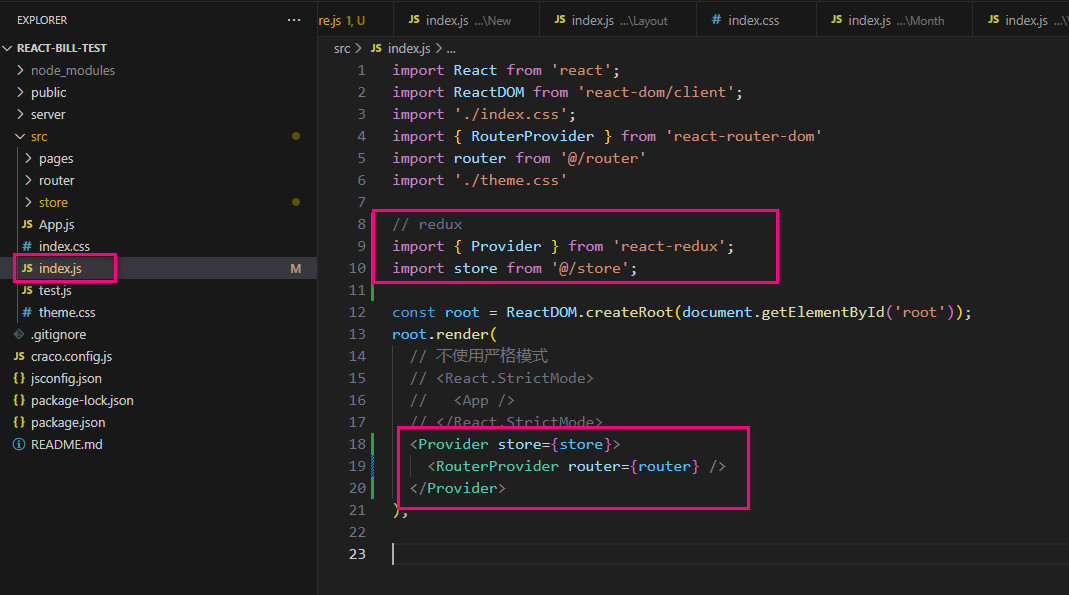
根组件包裹5/5
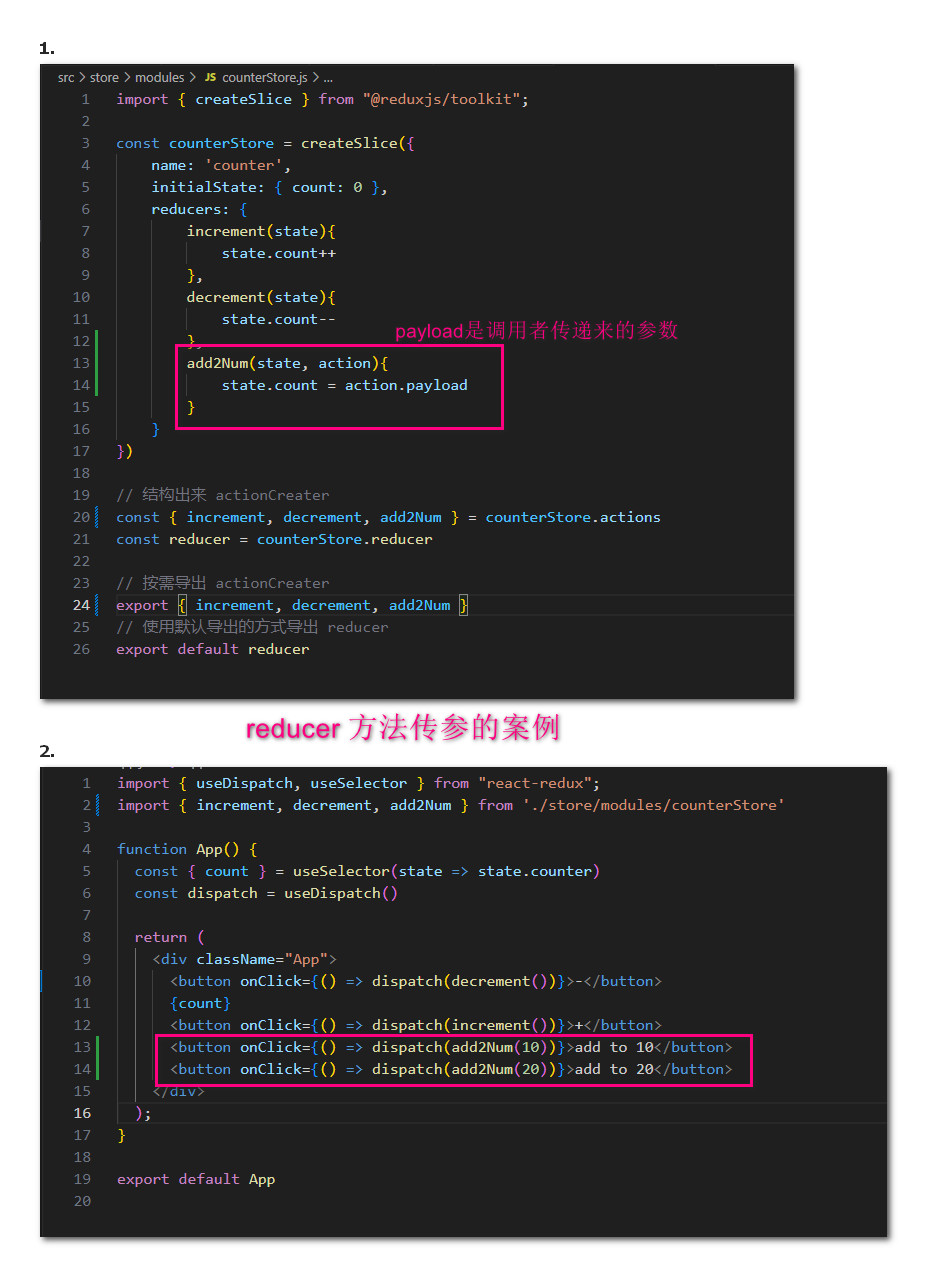
action 传参
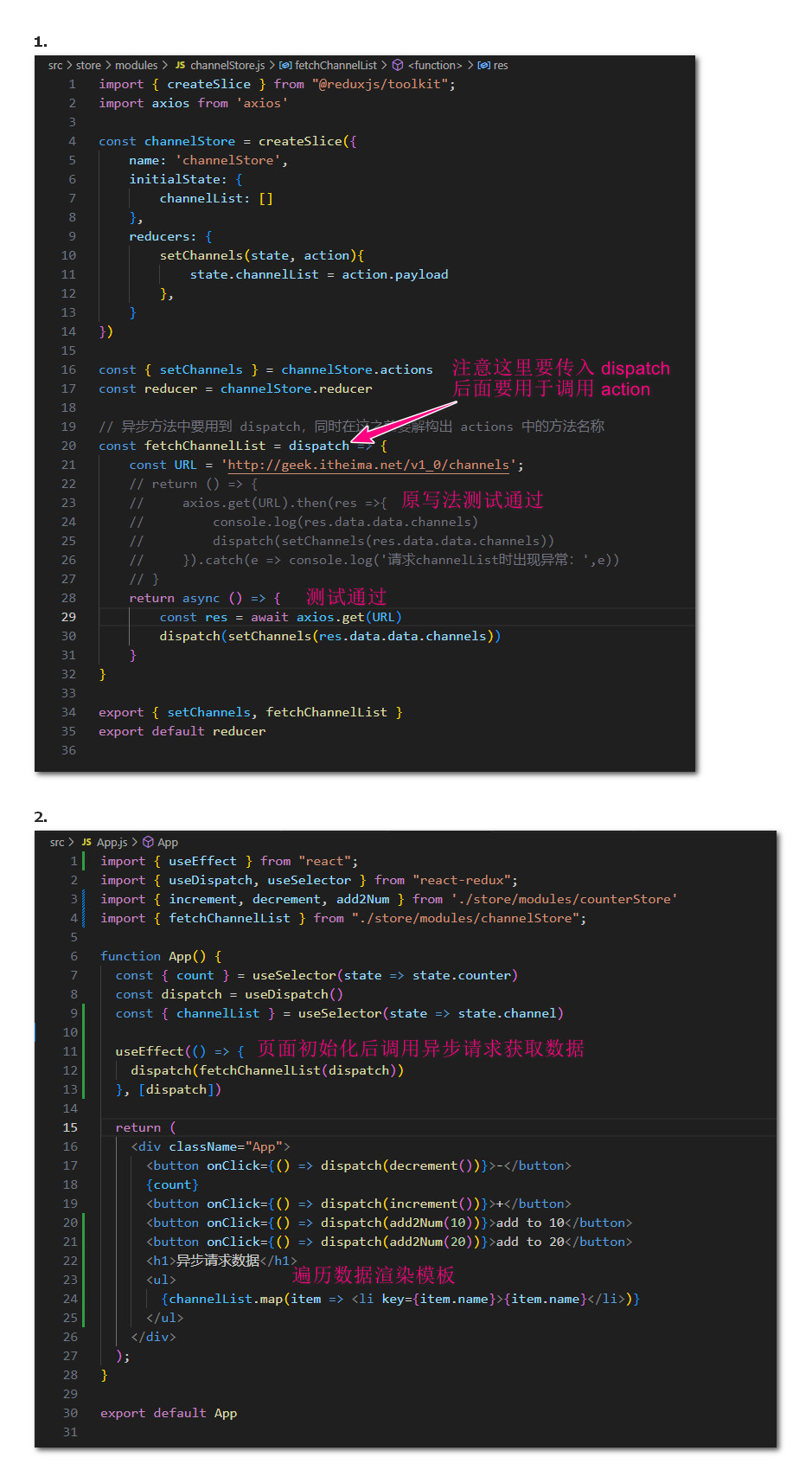
网络(异步)请求
原生 JS 使用
html代码:
<!DOCTYPE html>
<html>
<head>
	<meta charset="utf-8">
	<meta name="viewport" content="width=device-width, initial-scale=1">
	<title>redux-js使用案例</title>
	<!-- <script src="https://unpkg.com/redux@latest/dist/redux.min.js"></script> 原地址,访问不到-->
	<!-- <script src="https://cdnjs.cloudflare.com/ajax/libs/redux/4.1.1/redux.min.js"></script> CDN,2024年8月5日 08:47:49 测试可用-->
	<script type="text/javascript" src="redux.js"></script>
</head>
<body>
	<h1>redux-js</h1>
	<!-- onclick="handleDe()" -->
	<button id="decrement">-</button>
	<span id="count">0</span>
	<!-- onclick="handleAdd()" -->
	<button id="increment">+</button>
</body>
<script src="index.js"></script>
</html>
配到的JS代码
(function(){
  console.log('已加载JS文件');
})();

// redux使用步骤:
// 1. 定义 reducer 函数。根据不同的 action 对象返回不同的新的 state,基于数据不可变原则,修改对象属性,必须返回新的对象
// 2. 使用 reducer 函数生成 store 实例
// 3. 通过 store 实例的 subscribe 定语数据变化
// 4. 通过 store 实例的 dispatch 函数提交 action 更改状态
// 5. 通过 store 实例的 getState 方法获取最新状态并更新到视图中

// 1. reducer 函数
function reducer(state = { count: 0 }, action){
		if(action.type === 'INCREMENT') return { count: state.count + 1 }
		if(action.type === 'DECREMENT') return { count: state.count - 1 }
		return state
}

// 2. 通过 reducer 函数创建 store 实例
const store = Redux.createStore(reducer);

// 3. 订阅,查看状态变化
store.subscribe(() => {
	console.log('state变化了', store.getState())
	const span = document.getElementById("count")
	span.innerText = store.getState().count
})


const inBtn = document.getElementById('increment')
inBtn.addEventListener('click', () => {// 增加函数
		console.log('+');
		store.dispatch({ type: 'INCREMENT' })
})


const deBtn = document.getElementById('decrement')
deBtn.addEventListener('click', () => {
		console.log('-');
		store.dispatch({ type: 'DECREMENT' })
})