
mybatis-flex
Quick Start
官网
https://mybatis-flex.com/
依赖
<dependency>
    <groupId>com.mybatis-flex</groupId>
    <artifactId>mybatis-flex-spring-boot-starter</artifactId>
    <version>1.5.7</version>
</dependency>
<!-- 必须有,否则连接不上数据库 -->
<dependency>
    <groupId>org.springframework.boot</groupId>
    <artifactId>spring-boot-starter-jdbc</artifactId>
</dependency>
注意 mybatis 内部包含了 jdbc 依赖,而 mybaits-flex 没有,所以还要额外添加 jdbc 依赖
springboot 2.6.13
如果是 springboot2.6.13 需要下面的依赖
<dependency>
    <groupId>com.mysql</groupId>
    <artifactId>mysql-connector-j</artifactId>
</dependency>
<dependency>
    <groupId>org.springframework.boot</groupId>
    <artifactId>spring-boot-starter-jdbc</artifactId>
</dependency>
<dependency>
    <groupId>com.mybatis-flex</groupId>
    <artifactId>mybatis-flex-spring-boot-starter</artifactId>
    <version>1.8.3</version>
</dependency>
如果使用 druid 则不需要再引用 jdbc
<dependency>
    <groupId>com.alibaba</groupId>
    <artifactId>druid</artifactId>
    <version>1.2.16</version>
</dependency>
在配置类中指定扫描包路径后,mapper 接口就不需要使用注解 @Mapper 或者 @Repository
@MapperScan("com.example.expense.mapper")
实体类相关
不需要通过注解 Column 指定小驼峰和下划线的映射关系
@Table("tb_account")// 双引号中是数据库中的表名称
public class Account{
    @Id(keyType = KeyType.Auto)// 表示自增主键
    private Long id;
    @Column("bill_code")// 使用注解指定对应的字段名称
    private String billCode;
}
Mapper
创建一个无实际代码的 Mapper 注意泛型指定实体类,之后通过继承使用框架默认的基础方法
package com.xdf.autoweighingsqlserver.dao;
import com.mybatisflex.core.BaseMapper;
import com.xdf.autoweighingsqlserver.entity.MaterialBill;

@Repository
public interface MaterialBillMapper extends BaseMapper<MaterialBill> {
}
自动小驼峰
在 mapper 接口中使用注解 @Select 自定义语句查询数据,要将数据库数据根据下划线自动转换小驼峰样式并赋值实体类属性上,需要做如下配置。否则带有下划线的字段数据都无法赋值到对应的属性上
mybatis-flex:
  configuration:
    map-underscore-to-camel-case: true
    log-impl: org.apache.ibatis.logging.stdout.StdOutImpl
  type-aliases-package: com.xdf.showameter.entity
扫描包
在项目的启动类中指定 Mapper 所在的包路径
@MapperScan("com.xdf.autoweighingsqlserver.dao")
@SpringBootApplication
public class AutoWeighingSqlServerApplication {
    public static void main(String[] args) {
        SpringApplication.run(AutoWeighingSqlServerApplication.class, args);
    }
}
或者可以添加如下配置,来避免使用注解 @MapperScan ,配置项 map-underscore-to-camel-case 可以让 mapper 中的自定义 sql 字段自动转小驼峰
mybatis-flex:
  mapper-locations: classpath:mappers/*.xml
  configuration:
    map-underscore-to-camel-case: true
  base-package: com.onno.ems.part.mapper
测试
package com.xdf.autoweighingsqlserver;

import com.xdf.autoweighingsqlserver.dao.MaterialBillMapper;
import com.xdf.autoweighingsqlserver.entity.MaterialBill;
import org.junit.jupiter.api.Test;
import org.springframework.beans.factory.annotation.Autowired;
import org.springframework.boot.test.context.SpringBootTest;

import java.util.List;

@SpringBootTest
class AutoWeighingSqlServerApplicationTests {
    @Autowired
    private MaterialBillMapper materialBillMapper;
    @Test
    void contextLoads() {
        List<MaterialBill> materialBills = materialBillMapper.selectAll();
        System.out.println(materialBills);
    }
}
生成Def文件
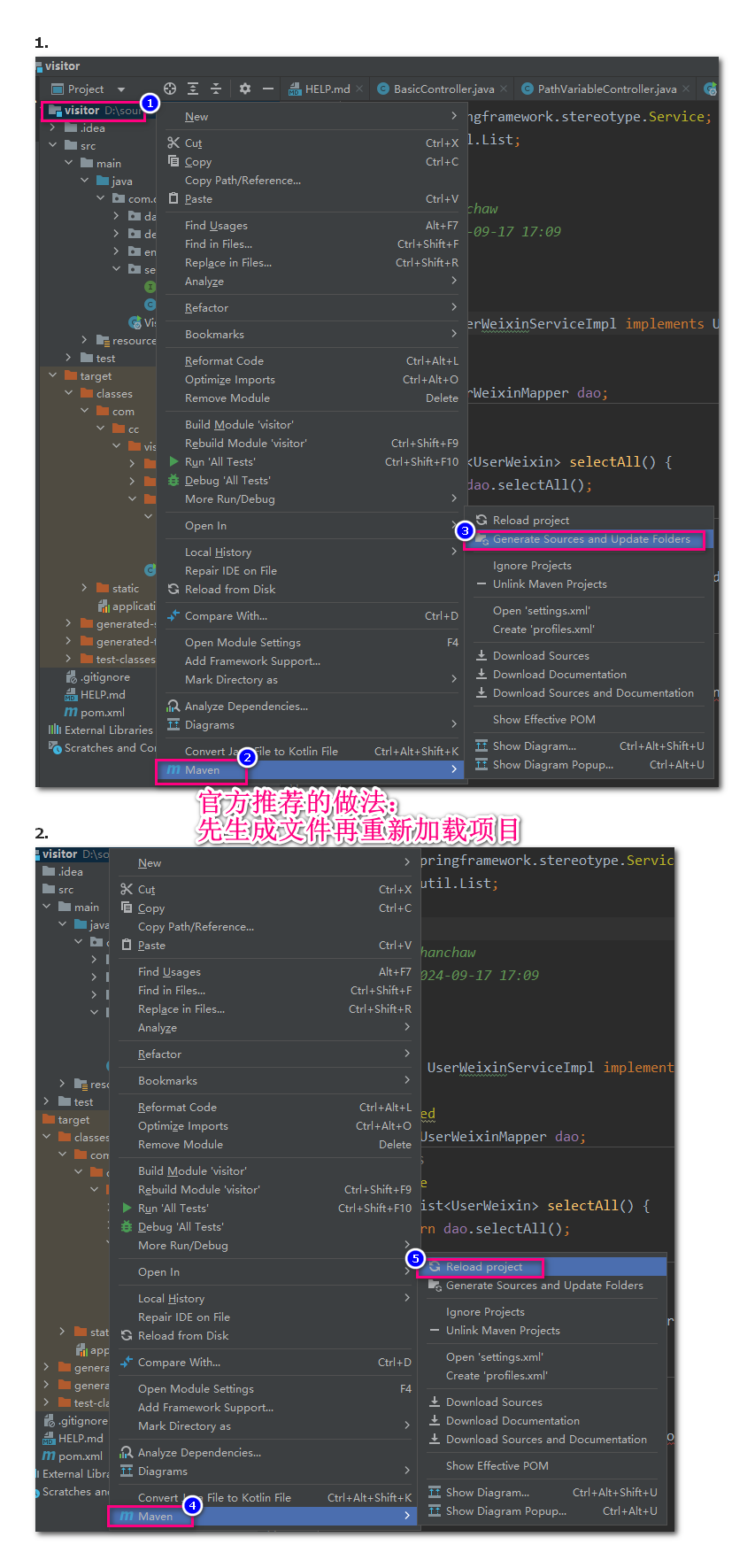
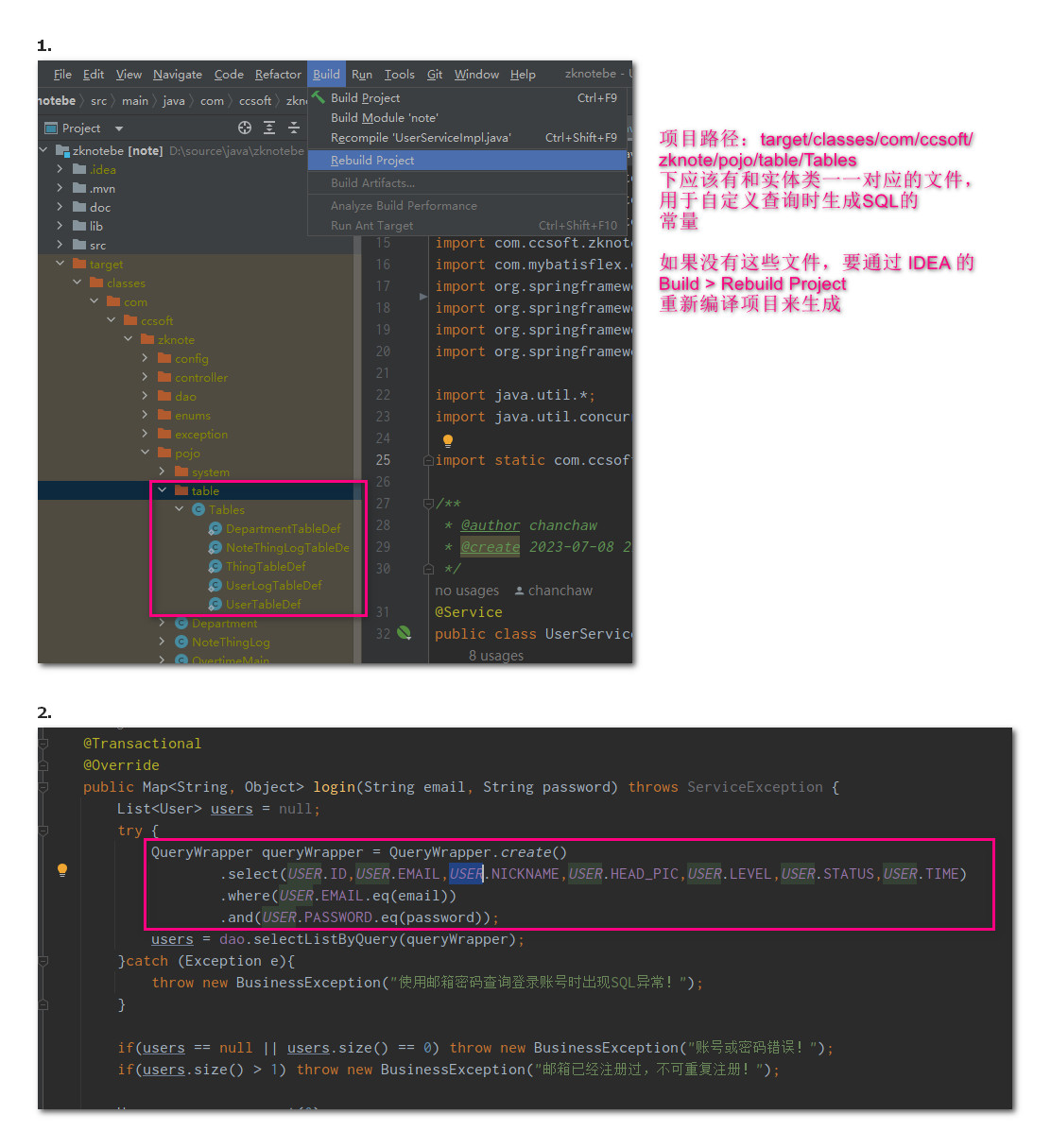
mybatis-flex 通过 APT (Annotation Processing Tool)技术依据实体类自动生成对应的常量实体类,参见 官方配置,按照下面官方推荐的方法生成实体类对应的 def 文件
如果实体类头上没有使用注解 Table,则不会生成其对应的 table.UserWeixinTableDef ,此时项目也是可以正常运行的,但是如果要用到 QueryWrapper 就要使用该注解并使用 IDEA 生成 UserWeixinTableDef
使用 mapper.xml
确保 springboot 项目的配置文件中有如下指定 xml 路径的配置
mybatis-flex:
  mapper-locations: 'classpath:/mappers/**/*.xml'
  configuration:
    log-impl: org.apache.ibatis.logging.stdout.StdOutImpl
  type-aliases-package: com.cc.visitor.entity
在 dao 的 java 源码中声明方法
@Repository
public interface UserWeixinMapper extends BaseMapper<UserWeixin> {
    List<UserWeixin> get8CustomSql();
}
在 xml 文件中制作自定义的 sql,下面是 xml 文件的完整代码
<?xml version="1.0" encoding="utf-8" ?>
<!DOCTYPE mapper PUBLIC "-//mybatis.org//DTD Mapper 3.0//EN"
        "http://mybatis.org/dtd/mybatis-3-mapper.dtd" >
<mapper namespace="com.cc.visitor.dao.UserWeixinMapper">
    <select id="get8CustomSql" resultType="com.cc.visitor.entity.UserWeixin">
        select * from user_weixin where 1=1;
    </select>
</mapper>
本功能参见 官网文档
配置与审计
下面的配置、审计、打印 SQL 脚本的案例都来自 nskems
配置自定义逻辑删除
制作配置类,可自定义逻辑删除字段以及删除的标记值,通过观察打印顺序可知实现的三个接口执行的顺序:MybatisFlex,Mybatis,SqlSessionFactoryBean,当自定义逻辑中有用到这三者的功能时注意顺序对调用的影响
package com.xdf.nskems.config;

import com.mybatisflex.core.FlexGlobalConfig;
import com.mybatisflex.core.mybatis.FlexConfiguration;
import com.mybatisflex.spring.boot.ConfigurationCustomizer;
import com.mybatisflex.spring.boot.MyBatisFlexCustomizer;
import com.mybatisflex.spring.boot.SqlSessionFactoryBeanCustomizer;
import org.mybatis.spring.SqlSessionFactoryBean;
import org.springframework.context.annotation.Configuration;

/**
 * mybatis-flex 配置类,对比原 mybatis 的配置先后顺序
 * 1. MybatisFlex
 * 2. MybatisConfiguration
 * 3. SqlSessionFactoryBean
 * @author chanchaw
 * @create 2025-11-28 16:20
 */
@Configuration
public class MybatisFlexConfig implements ConfigurationCustomizer, SqlSessionFactoryBeanCustomizer, MyBatisFlexCustomizer {
    @Override
    public void customize(FlexConfiguration flexConfiguration) {
        System.out.println("开始 Mybatis 配置");
        FlexGlobalConfig globalConfig = FlexGlobalConfig.getDefaultConfig();
        FlexGlobalConfig.getDefaultConfig().setLogicDeleteColumn("is_delete");
        //设置数据库正常时的值
        globalConfig.setNormalValueOfLogicDelete(0);
        //设置数据已被删除时的值
        globalConfig.setDeletedValueOfLogicDelete(1);
    }

    @Override
    public void customize(SqlSessionFactoryBean sqlSessionFactoryBean) {
        System.out.println("开始 SqlSessionFactoryBean 配置");
    }

    @Override
    public void customize(FlexGlobalConfig flexGlobalConfig) {
        System.out.println("开始 MybatisFlex 配置");
    }
}
打印SQL
通过下面配置可在开发过程中打印 SQL 到控制台(最后一行配置),实际不需要开启该功能,在开启审计功能后也会打印执行的 SQL 还带有耗费时间,信息更全面
mybatis-flex:
  mapper-locations: classpath:mappers/*.xml
  configuration:
    map-underscore-to-camel-case: true
    log-impl: org.apache.ibatis.logging.stdout.StdOutImpl
审计
在配置类中使用 AuditManager.setAuditEnable(true); 即可开启审计功能,会将 SQL 执行的:语句、参数、耗时等打印在控制台,打印内容如下
{
    platform='MyBatis-Flex', module='null', url='null', bizId='null', user='null', userIp='null', hostIp='192.168.85.1', query='UPDATE `bd_device` SET `code` = ?  WHERE `id` = ?  AND `is_delete` = 0', queryParams=[测试修改01, 1], queryCount=1, queryTime=1764377182370, elapsedTime=24, dsName=MyBatis-Flex, metas=null
}
其中 module,rul,bizId,user,userIp 都需要开发者自定义填充(上面打印的内容是开启审计功能后默认打印的数据)。
自定义消息格式
创建消息工厂类,可自定义消息显示格式
package com.xdf.nskems.config.MybatisFlex;

import com.mybatisflex.core.audit.AuditMessage;

/**
 * 自定义 MybatisFlex SQL 审计的消息,包含如下属性
 * {platform='MyBatis-Flex', module='null', url='null', bizId='null', user='null', userIp='null',
 * hostIp='192.168.85.1', query='UPDATE `bd_device` SET `code` = ?  WHERE `id` = ?  AND `is_delete` = 0',
 * queryParams=[测试修改01, 1], queryCount=1, queryTime=1764377182370, elapsedTime=24, dsName=MyBatis-Flex, metas=null}
 *
 * 前面几个属性:module,url,bizId,user,userIp,都需要开发者自己填充
 * 本类的作用是填充这几个属性
 * @author chanchaw
 * @create 2025-11-29 9:40
 */
public class MessageFactory implements com.mybatisflex.core.audit.MessageFactory {
    @Override
    public AuditMessage create() {
        AuditMessage msg = new AuditMessage();
        msg.setPlatform("MybatisFlex");
        // TODO: 需要开发人员自定义填充属性:module,url,bizId,user,userIp
        // msg.setModule("");...
        return msg;
    }
}
将自定义消息工厂设置到审计功能中
AuditManager.setAuditEnable(true);// 开启审计
AuditManager.setMessageFactory(new MessageFactory());// 自定义审计消息格式工厂
收集日志发送消息中间件
制作自定义消息记录器(代码如下)后设置到审计功能中,即可实现默认的每10s收集日志后发送到消息中间件
package com.xdf.nskems.config.MybatisFlex;

import com.mybatisflex.core.audit.AuditMessage;
import com.mybatisflex.core.audit.MessageReporter;

import java.util.List;

/**
 * @author chanchaw
 * @create 2025-11-29 9:49
 */
public class ConsoleMessageReporter implements MessageReporter {
    @Override
    public void sendMessages(List<AuditMessage> list) {
        for (AuditMessage msg : list) {
            System.out.println("====== MybatisFlex SQL Audit:" + msg.toString() + " ======");
        }
    }
}
记得将记录器设置给审计功能
AuditManager.setAuditEnable(true);// 开启审计
AuditManager.setMessageFactory(new MessageFactory());// 自定义审计消息工厂
AuditManager.setMessageReporter(new ConsoleMessageReporter());//设置自定义记录器,其中实现发送审计消息到消息中间件kafka
修改收集器默认10s
在上面 收集日志发送消息中间件 中的代码 AuditManager.setMessageReporter(new ConsoleMessageReporter()); 更换为 AuditManager.setMessageCollector(new ScheduledMessageCollector(5,new ConsoleMessageReporter())); 表示每5秒收集发送一次
单体项目最佳实践
单体项目直接将审计消息写入本地日志文件即可
AuditManager.setAuditEnable(true);// 开启审计
AuditManager.setMessageFactory(new MessageFactory());// 自定义审计消息工厂
// logger是自定义的日志文件,将所有审计消息写入一个日志文件中
AuditManager.setMessageCollector(msg -> logger.info("elapsed:{}ms,sql:{}", msg.getElapsedTime(),msg.getFullSql()));
DEMO
多数据源
配置多数据源
首先在 pom.xml 中添加 mybatis-flex 的依赖,然后在配置文件中添加如下配置,注意 mybaits-flex 节点是顶层节点
mybatis-flex:
  datasource:
    pri:
      type: com.alibaba.druid.pool.DruidDataSource
      url: jdbc:mysql://localhost:3306/sample_private
      username: root
      password: chanchaw
      # 下面两个参数用于 druid 检测和数据库的连接
      test-white-idle: true
      validation-query: SELECT 1
    pub:
      type: com.alibaba.druid.pool.DruidDataSource
      url: jdbc:mysql://localhost:3306/sample_public
      username: root
      password: chanchaw
      test-white-idle: true
      validation-query: SELECT 1
  mapper-locations: classpath:/mappers/*.xml
  configuration:
    map-underscore-to-camel-case: true
    log-impl: org.apache.ibatis.logging.stdout.StdOutImpl
只要这样配置就可以启动项目进行测试了,默认使用从上到下的第一个数据源
切换数据源
有多种方式切换数据源,首先介绍在实体类上使用注解 @Table
@Table(value = "tb_account", dataSource = "ds1",
      onSet = {
          AccountPermissionListener.class,
          AccountCryptListener.class,
          AccountDictListener.class
      }
      )
public class Account {
    ...
}
第二种方式,通过注解 @UseDataSource 切换数据源,可以用在类上(mapper,service,controller 都可以),也可以在方法上。自己测试通过,在 mapper 接口头上使用成功。本注解优先级高于上面的 @Table,即如果实体类 Account 通过 @Table 指定了使用 ds1,但是其对应的 mapper 接口 AccountMapper 上使用注解 @UseDataSource 指定了使用 ds2 则最终会使用 ds2
@UseDataSource("pri")
@Repository
public interface CompanyMapper {
    int insert(Company record);
    ...
}
类似的,如果注解 @UseDataSource 同时作用于 AccountMapper 上,又在其下的方法 SelectAll 使用并指向 ds3,则最终使用的是 ds3,即方法上的优先级高于类上的优先级。
第三种方式,编码手动切换,注意使用完成后要调用 clear 清除,否则之后的所有操作都针对新设置的数据源进行
public List<Account> list(){
    try{
        DataSourceKey.use("ds4");
        return super.list();
    }finally{
        DataSource.clear();
    }
}
库API
insertSelective- 在实体类上通过注解@Id(keyType = KeyType.Auto)标注自增主键后,新增后可立即得到最新的主键,但是其他字段的默认值不会获取
监听器
要监听实体类的新增和修改,可通过实体类的注解 Table,代码如下:
// 实体类,user_weixin表示关联的表名称,onInsert表示监听新增动作的类,在新增数据之前执行
// 所以这里可以通过抛出异常拦截新增数据
@Table(value = "user_weixin", onInsert = InsertListenerUserWeixin.class)
public class UserWeixin implements Serializable{
    ...
}

// 监听类完整代码
package com.cc.visitor.config;
import com.cc.visitor.entity.UserWeixin;
import com.mybatisflex.annotation.InsertListener;

/**
 * @author chanchaw
 * @create 2024-09-19 8:21
 */
public class InsertListenerUserWeixin implements InsertListener {
    @Override
    public void onInsert(Object o) {
        UserWeixin record = (UserWeixin)o;
        System.out.println(record);
    }
}
逻辑删除
制作全局配置类,设置表示删除的字段 is_delete,通过方法 setNormalValueOfLogicDelete 设置有效数据的值,通过方法 setDeletedValueOfLogicDelete 设置被删除数据的值。要特别注意通过 BaseMapper 调用 mybatis-flex 提供的API查询数据时都是默认不会返回被删除数据的,即 mybatis-flex 会自动在 sql 后面添加 is_delete=0,本功能介绍见 官网文档 制作全局逻辑删除配置后要求所有表都有字段 is_delete 作为被删除的标识字段,但是如果是通过自定义的 mapper.xml 中的 sql 查询需要自己手动控制是否过滤被删除的数据
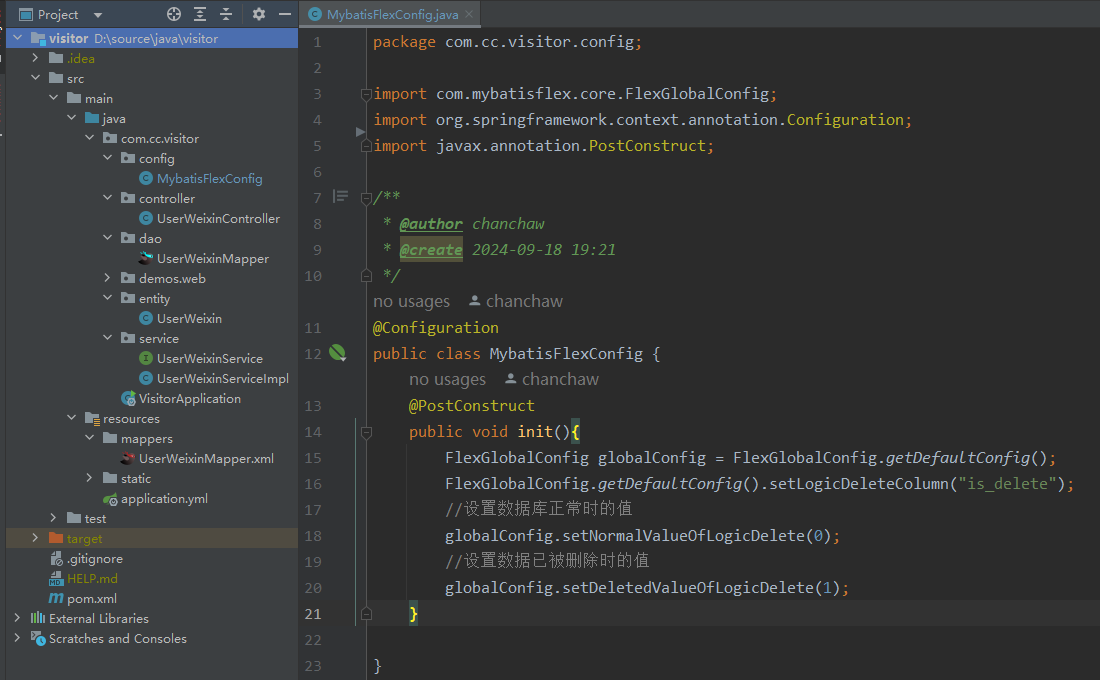
上面图片的代码
package com.cc.visitor.config;

import com.mybatisflex.core.FlexGlobalConfig;
import org.springframework.context.annotation.Configuration;
import javax.annotation.PostConstruct;

/**
 * @author chanchaw
 * @create 2024-09-18 19:21
 */
@Configuration
public class MybatisFlexConfig {
    @PostConstruct
    public void init(){
        FlexGlobalConfig globalConfig = FlexGlobalConfig.getDefaultConfig();
        FlexGlobalConfig.getDefaultConfig().setLogicDeleteColumn("is_delete");
        //设置数据库正常时的值
        globalConfig.setNormalValueOfLogicDelete(0);
        //设置数据已被删除时的值
        globalConfig.setDeletedValueOfLogicDelete(1);
    }
}
选择性新增
java 中直接调用 insert(entity) 是全量新增,即会将属性值为 null 覆盖到数据库中带有默认值的字段上,如果要选择性新增可使用下面两个方法 官网相关文档是 增删改查
insertSelective(entity)
或者
insert(entity, true)
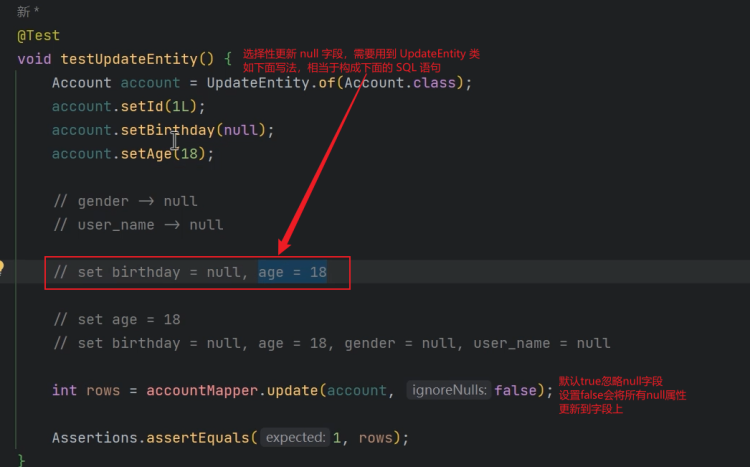
选择性更新null
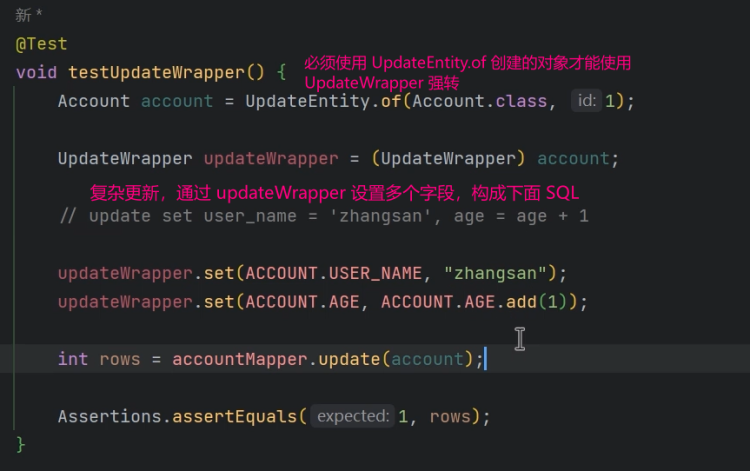
复杂更新 updateWrapper
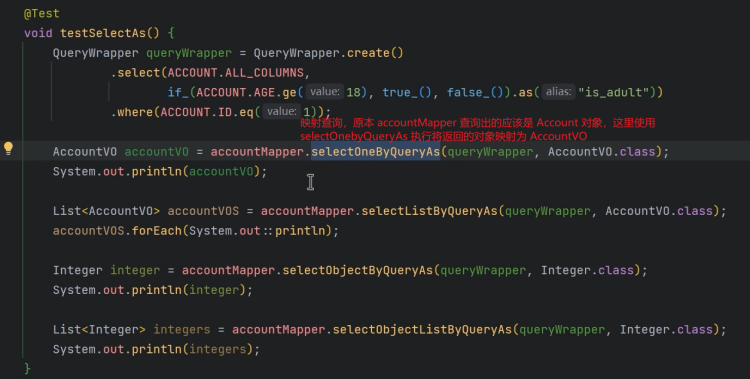
映射查询
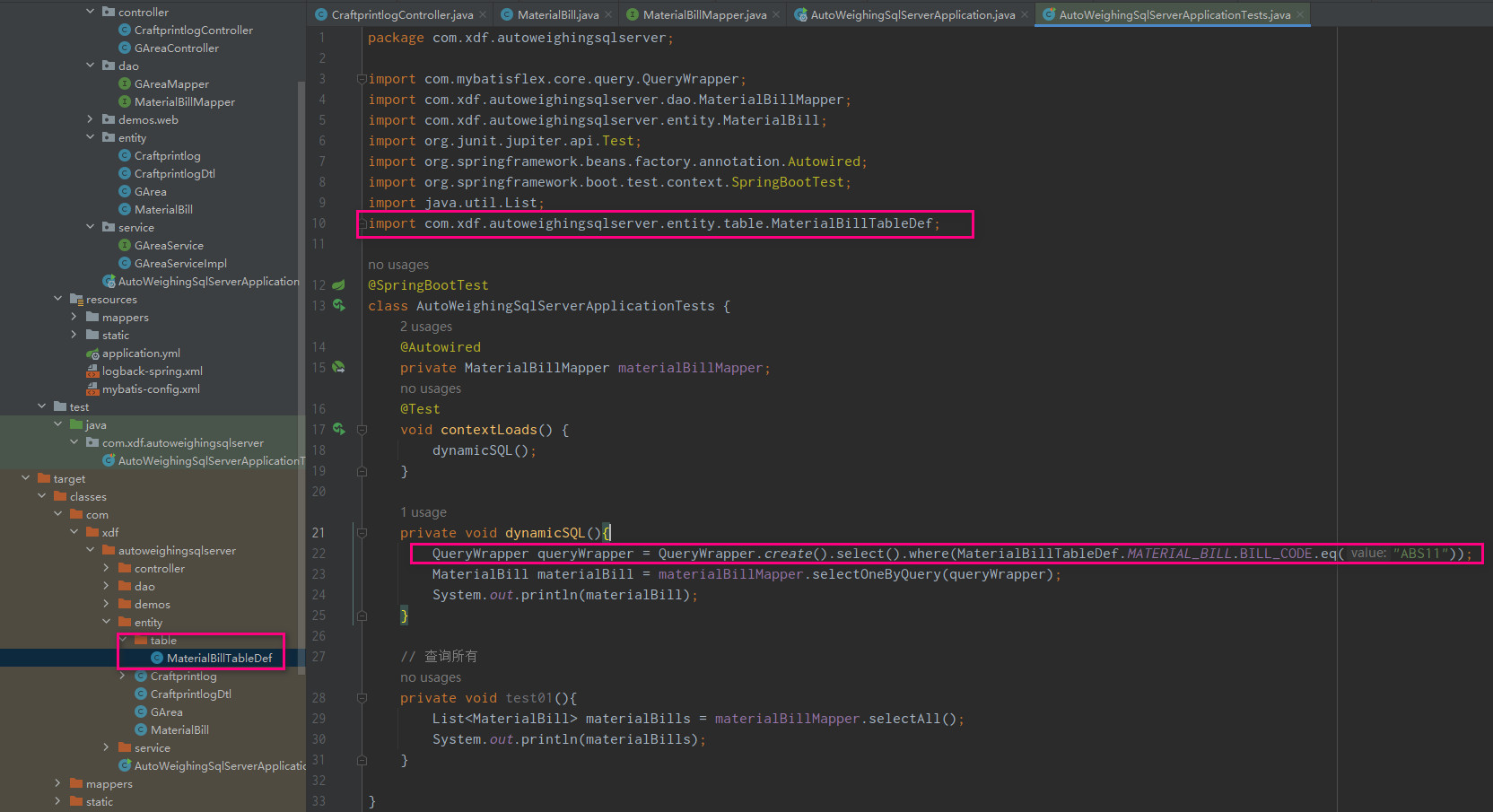
QueryWrapper自定义查询
mybatis-flex 会生成表结构相关的定义文件,在自定义的动态SQL中会用到,可 import 到 UserWeixinTableDef 也可以通过 static 修改后 import static com.cc.visitor.entity.table.UserWeixinTableDef.USER_WEIXIN;
package com.xdf.autoweighingsqlserver;

import com.mybatisflex.core.query.QueryWrapper;
import com.xdf.autoweighingsqlserver.dao.MaterialBillMapper;
import com.xdf.autoweighingsqlserver.entity.MaterialBill;
import org.junit.jupiter.api.Test;
import org.springframework.beans.factory.annotation.Autowired;
import org.springframework.boot.test.context.SpringBootTest;
import java.util.List;
import com.xdf.autoweighingsqlserver.entity.table.MaterialBillTableDef;

@SpringBootTest
class AutoWeighingSqlServerApplicationTests {
    @Autowired
    private MaterialBillMapper materialBillMapper;
    @Test
    void contextLoads() {
        dynamicSQL();
    }

    private void dynamicSQL(){
        QueryWrapper queryWrapper = QueryWrapper.create().select().where(MaterialBillTableDef.MATERIAL_BILL.BILL_CODE.eq("ABS11"));
        MaterialBill materialBill = materialBillMapper.selectOneByQuery(queryWrapper);
        System.out.println(materialBill);
    }

    // 查询所有
    private void test01(){
        List<MaterialBill> materialBills = materialBillMapper.selectAll();
        System.out.println(materialBills);
    }

}
in 和排序的用法:
@Override
public List<Thing> getUserThings(Integer userId) {
    userId = Optional.ofNullable(userId).orElse(0);
    if(userId == 0) throw new BusinessException("没有获得用户ID,无法查询其小记!");

    ArrayList<Integer> statusList = new ArrayList<>();
    statusList.add(-1);statusList.add(0);
    QueryWrapper queryWrapper = QueryWrapper.create()
            .where(THING.USER_ID.eq(userId))
            .and(THING.STATUS.notIn(statusList))
            .orderBy(THING.FINISHED.asc(),THING.TOP.desc(),THING.UPDATE_TIME.desc())
            ;
    return dao.selectListByQuery(queryWrapper);
}
Map自定义查询
创建 map 对象,键使用表字段,注意是原始字段,不是实体类的属性 - 有下划线。
public List<AlertEmp> getPressureEmps(){
    HashMap<String, Object> map = new HashMap<>();
    map.put("alert_type", AlertType.PRESSURE_DATA.getSid());
    return dao.selectListByMap(map);
}
兼容原 Mybatis
升级到Mybatis-flex
- 在
pom.xml中注释掉mybatis的依赖,转而使用下面代码
<dependency>
    <groupId>com.mybatis-flex</groupId>
    <artifactId>mybatis-flex-spring-boot-starter</artifactId>
    <version>1.10.9</version>
</dependency>
<dependency>
    <groupId>com.zaxxer</groupId>
    <artifactId>HikariCP</artifactId>
</dependency>
注意原本的 mybatis 在 springboot 中是会关联依赖 hikari,但是 mybatis-flex 没有,所以还需要手动添加 hikari 的依赖
- 项目中老的
XxxMapper.java不要使用extends BaseMapper<Employee>,以后新增的dao文件再通过继承使用mybatis-flex内置的方法
原生注解方式
mybatis-flex 完全兼容原生 mybatis,例如下面的代码,是使用 mybatis-flex 的 mapper 文件中使用了原生 mybatis 的注解方式查询数据
public interface MyAccountMapper extends BaseMapper<Account>{
    @Select("select * from tb_account where id = #{id}")
    Account selectById(@Param("id") Object id);
}
同时支持类似的:@Delete、@Update、@Insert、@InsertProvider、@DeleteProvider、@UpdateProvider、@SelectProvider等等。
原生 XML 方式
错误与提示
'sqlSessionFactory' or 'sqlSessionTemplate' are required
springboot2.6 默认不会自动引入 HikariCP(尤其是在某些依赖组合下),导致 DataSource 没有被正确创建或注册,从而 sqlSessionFactory 初始化失败。需要添加依赖
<!-- Spring Boot 2.6.x 推荐使用 HikariCP 4.x -->
<dependency>
    <groupId>com.zaxxer</groupId>
    <artifactId>HikariCP</artifactId>
    <version>4.0.3</version>
</dependency>
xml报错
之前自定义的代码生成器生成的 XxxMapper.xml 不可直接拷贝给 mybatis-flex 项目使用,可去掉 BaseResultMap 后再使用,注意 xml 文件中不要有和 mybatis-flex 默认实现的方法重名
class "com.xxx" cannot be cast class "com.xxx"
参见官方文档的 常见问题 ,是spring-devtools 导致的,可通过注释该依赖项解决。如果仍然要使用该依赖则在 resources 下创建文件 spring-devtools.properties 其中代码为:
restart.include.mapper=/mapper-[\\w-\\.].jar
restart.include.pagehelper=/pagehelper-[\\w-\\.].jar
restart.include.mybatis-flex=/mybatis-flex-[\\w-\\.]+jar
如果重启项目仍然报错则重启电脑后再次尝试。