
WindowsAPI
GetWindowThreadProcessId
获取窗口绑定的PID
ReadProcessMemory
跨进程读取内存数据(外挂程序读取游戏进程的数据)
FreeLibraryAndExitThread
释放 dll 并退出当前线程
GetCurrentProcess
获取当前进程句柄,其作用类似 OpenProcess,都是为了获取进程句柄
HANDLE h = GetCurrentProcess();
OpenProcess
获取指定进程句柄,一般做跨进程客户端时使用其获取目标进程句柄
CreateRemoteThread
概述
下面是官方文档介绍的该API的原型
HANDLE CreateRemoteThread(
  [in]  HANDLE                 hProcess,
  [in]  LPSECURITY_ATTRIBUTES  lpThreadAttributes,
  [in]  SIZE_T                 dwStackSize,
  [in]  LPTHREAD_START_ROUTINE lpStartAddress,
  [in]  LPVOID                 lpParameter,
  [in]  DWORD                  dwCreationFlags,
  [out] LPDWORD                lpThreadId
);
参数介绍
hProcess
官方文档的原文是: A handle to the process in which the thread is to be created. The handle must have the PROCESS_CREATE_THREAD, PROCESS_QUERY_INFORMATION, PROCESS_VM_OPERATION, PROCESS_VM_WRITE, and PROCESS_VM_READ access rights, and may fail without these rights on certain platforms. For more information, see Process Security and Access Rights.
通俗的讲解是:
hProcess 是一个进程的句柄,之后会在该进程中创建线程,要求该句柄要有权限:PROCESS_CREATE_THREAD, PROCESS_QUERY_INFORMATION, PROCESS_VM_OPERATION, PROCESS_VM_WRITE, and PROCESS_VM_READ,如果没有这些权限则该API会执行失败。
A handle to the process in which the thread is to be created:一个将要创建线程的进程的句柄(之后会在其中创建线程的进程的句柄)
MessageBoxA
#include <iostream>
#include <Windows.h> // 注意要包含这个

int add(int a, int b) {
	printf("=================================\r\n");
	printf("调用技能传入参数:\r\n十进制:a:%d,b:%d\r\n十六进制:a:%X,b:%X\r\n",a,b,a,b);
	return a + b;
}

int main()
{
    // 创建一个带有确定按钮的 msgbox
	MessageBoxA(0, "第一次msgbox", "这里是标题", 0);
	add(10,12);
	printf("main函数中打印add函数的地址:%p\n", add);
	getchar();
}
上面代码的效果如下图 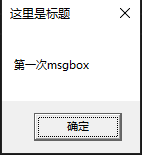
打印输出
wchar_t*
wchar_t* title = getWindowTitle(hwnd);
wchar_t* className = getWindowClassName(hwnd);

// 转换为多字节字符串并打印
wprintf_s(L"窗口标题:%s\n", title);
wprintf_s(L"窗口类名:%s\n", className);
wcout
输出宽字符时不可使用 cout 要使用有同样功能的 wcout,同时在输入前要设置字符集
wcout.imbue(locale("chs"));
wcout<< wp <<endl;
cout / wcout
导包
如果有报错,记得包含下面头文件
#include <stdio.h>
#include <iostream>
#include <string>
using namespace std;
同时注意要输出宽字符的话使用 wcout
printf
概述
官网提供打印各种类型数据的文档
| 符号 | 说明 |
|---|---|
| c | 单独一个字符 |
| s | string类型 |
| d或者i | 十进制有符号整型,可用于:UINT_PTR等 |
| o | 八进制无符号整型 |
| x或者X | 十六进制无符号整型 |
| u | 十进制无符号整型 |
| f或者F | 十进制浮点数 |
| e或者E | Transforms a floating-point number to a decimal exponent notation |
| a or A | Displays a floating-point number using a hexadecimal exponent |
| g or G | Displays a floating-point number using decimal or decimal exponent notation |
| n | Returns the number of characters written by far using this call function. It writes the result to the value pointed by the argument. |
| p | A pointer that points to the implementation-defined character sequence |
// ====== 打印十六进制数据 ======
const char* roleName="player";
UINT_PTR retVal = 0;// 用于接收返回值
UINT_PTR funcAddr = 0x60C1F0;// 调用的call的起始地址(函数的起始地址)
__asm {
    lea eax,roleName
    push eax
    call funcAddr
    add esp,4 // 外平栈
    mov retVal,eax // 返回值赋值给cpp变量
}
// 上面的类型 UINT_PTR 的数据可以按照十六进制的方法打印出来
printf("返回值:%X\r\n", retVal);


// ====== 打印指针类型数据 ======
const char* roleName="player";
UINT_PTR retVal = 0;// 用于接收返回值
UINT_PTR funcAddr = 0x60C1F0;// 调用的call的起始地址(函数的起始地址)
__asm {
    lea eax,roleName
    push eax
    call funcAddr
    add esp,4 // 外平栈
    mov retVal,eax // 返回值赋值给cpp变量
}
// 上面的类型 UINT_PTR 的数据可以按照十六进制的方法打印出来
printf("返回值:%p\r\n", retVal);
打印 string
std::string dt = getNowStr();// 返回string类的对象
const char* ret = dt.c_str();// 转换为C风格的 char*
TRACE("mountMainThread:%s - 第一次通过TRACE调试程序", ret);// 使用 printf 一样可以打印
窗口相关
窗口标题
/*
  hWnd:窗口句柄
  使用案例:
  HWND hWnd = GetForegroundWindow();// 获取当前Z轴最前端窗口句柄
  CHAR* wszTitle = getWindowTitle(hWnd);
  printf("窗口标题:%s\n", wszTitle);
 */
CHAR* getWindowTitle(HWND hWnd) {
	DWORD dwProcess;
	LRESULT result = 0;
	DWORD dwPID = GetWindowThreadProcessId(hWnd, &dwProcess);
	HANDLE hProcess = OpenProcess(PROCESS_QUERY_INFORMATION, FALSE, dwProcess);
	WCHAR wszProcessPath[MAX_PATH] = { 0 };
	DWORD dwSize = MAX_PATH;
	QueryFullProcessImageNameW(hProcess, 0, wszProcessPath, &dwSize);
	CHAR wszTitle[MAX_PATH] = { 0 };
	result = GetWindowTextA(hWnd, wszTitle, MAX_PATH);
	return wszTitle;
}
下面是获取宽字符的窗口标题和窗口类,兼容中文
HWND hwnd = GetForegroundWindow(); // 获取当前活动窗口的句柄

wchar_t title[256];
GetWindowTextW(hwnd, title, 256);

wchar_t className[256];
GetClassNameW(hwnd, className, 256);

setlocale(LC_ALL, "chs");
std::wcout << L"窗口标题:" << title << endl << L"窗口类:" << className << endl;
窗口类
/*
  hWnd:目标窗口句柄
  返回的数据类型 TCHAR* 是宽字符类型,采用下面的打印方法:
  setlocale(LC_ALL, "chs");
  wprintf_s(L"getWindowClass函数内窗口类:%s", szBuf_class);
  注意不可在 printf 之后使用 wprintf_s,否则无法正确打印数据
 */
TCHAR* getWindowClass(HWND hWnd) {
	TCHAR szBuf_class[MAX_PATH];
	GetClassName(
		hWnd,					// 窗口句柄
		szBuf_class,		// 接收窗口类名的缓冲区指针
		MAX_PATH			// 缓冲区字节大小
	);
	setlocale(LC_ALL, "chs");
	wprintf_s(L"窗口类:%s\n", szBuf_class);
	return szBuf_class;
}
获取指定类型的窗口
void getAllWindow01() {
	HWND hwnd = nullptr;
	LPCWSTR clsName = L"WindowsForms10.Window.8.app.0.3d90434_r8_ad1";
	setlocale(LC_ALL, "chs");
	do {
		hwnd = FindWindowEx(nullptr, hwnd, clsName, nullptr);
		if (hwnd != nullptr) {
			// 找到窗口了,可以在这里进行相应的操作
			CHAR* title = getWindowTitle(hwnd);
			//std::cout << "hwnd: " << hwnd << ",的标题是:" << title << std::endl;
			//wcout << "hwnd: " << hwnd << ",的标题是:" << title << endl;
			printf("窗口句柄:%X,的标题是:%s\n", hwnd, title);
		}
	} while (hwnd != nullptr);
}
前台窗口
HWND hwnd = GetForegroundWindow(); // 获取当前活动窗口的句柄(当前前台窗口句柄)

// 获取窗口标题(传入窗口句柄)
std::wstring getWindowTitle(HWND hwnd) {
	wchar_t title[256];
	GetWindowTextW(hwnd, title, sizeof(title) / sizeof(title[0]));
	return std::wstring(title);
}

// 获取窗口类名(传入窗口句柄)
std::wstring getWindowClassName(HWND hwnd) {
	wchar_t className[256];
	GetClassNameW(hwnd, className, sizeof(className) / sizeof(className[0]));
	return std::wstring(className);
}

// 宽字符转多字节字符串
std::string ws2s(const std::wstring& wstr) {
	int bufferSize = WideCharToMultiByte(CP_UTF8, 0, wstr.c_str(), -1, nullptr, 0, nullptr, nullptr);
	std::string str(bufferSize, 0);
	WideCharToMultiByte(CP_UTF8, 0, wstr.c_str(), -1, &str[0], bufferSize, nullptr, nullptr);
	return str;
}
通过API GetForegroundWindow 可以获取当前前台窗口(当前显示在Z轴最上层的窗口)的句柄,同理可以通过 SetForegroundWindow 设置指定句柄的窗口为前台,下面代码是通过窗口类查询获取窗口句柄后设置为前台窗口的方法
void setTopWPS() {
	HWND hwnd = nullptr;
	// Remote Desktop Connection Manager 的窗口类
	LPCWSTR clsName = L"OpusApp";
	do {
		hwnd = FindWindowEx(nullptr, hwnd, clsName, nullptr);
		if (hwnd != nullptr) {
			// 找到窗口了,可以在这里进行相应的操作
			CHAR* title = getWindowTitle(hwnd);// 根据窗口句柄获取窗口标题
			::SetForegroundWindow(hwnd);// 设置指定的窗口为前台窗口
			printf("置顶窗口句柄:%X,的标题是:%s\n", hwnd, title);
			return;
		}
	} while (hwnd != nullptr);

	printf("没有找到类型 OpusApp 的窗口!\n");
}